Quick Answer
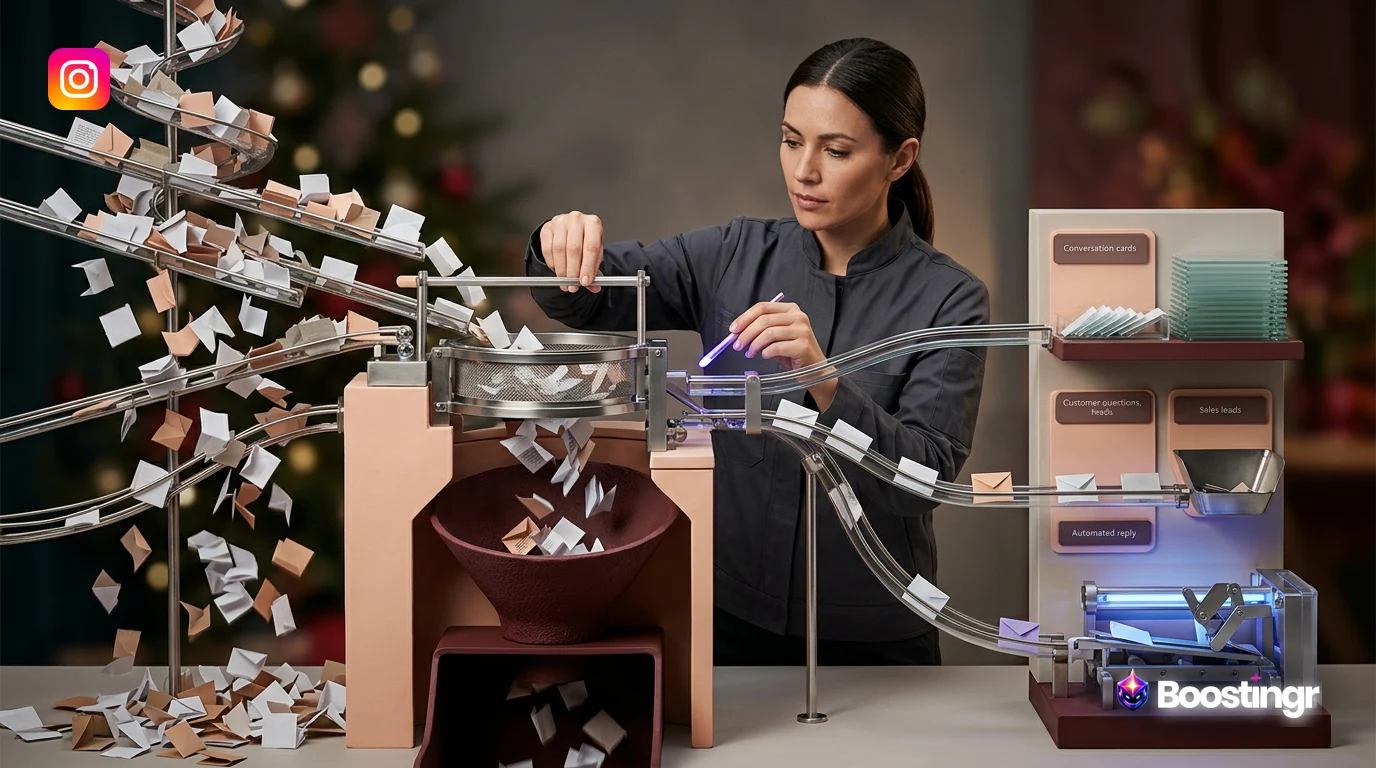
Instagram comment automation is a strategic workflow that uses AI to manage public comments on your posts, Reels, and ads. It goes beyond basic bots to intelligently classify, moderate, and reply to comments, enabling brands to protect their community, scale engagement with humanized responses, and automatically capture high-intent leads directly from the comment section, all within a unified system.
The Overwhelming Opportunity in Your Instagram Comments
Your Instagram comment section is a goldmine. It’s a real-time focus group, a lead generation engine, and a direct line to your community. Every comment is an opportunity: a question to answer, a lead to capture, a fan to delight, or feedback to improve your product. But for most growing brands, it's also a source of chaos.
Manually sifting through hundreds or thousands of comments is unsustainable. You're battling spam, navigating trolls, trying to answer customer questions, and desperately attempting to spot buying signals before they go cold. The result? Missed leads, frustrated customers, a tarnished brand image, and a burned-out social media team.
Traditional solutions fall short. Basic keyword filters are clumsy, hiding legitimate questions while letting sophisticated spam slip through. Canned auto-replies feel robotic and alienate your audience. You need more than a simple tool; you need an intelligent system. This is where a strategic approach to **Instagram comment automation** transforms your biggest bottleneck into your most powerful growth channel.
The Shift from Basic Bots to Intelligent Workflows
For years, “automation” on Instagram meant clunky, rule-based bots. You’d set a keyword like “price,” and the bot would fire off the same generic DM to anyone who used it. This approach is not only ineffective but also risky. It lacks nuance, fails to understand context, and often creates a frustrating user experience that can damage your brand's reputation.
Intelligent **Instagram comment automation** represents a fundamental shift. It’s not about replacing humans with rigid bots; it's about augmenting your team with AI that understands people. Instead of just reading comments for keywords, an intelligent platform like Boostingr understands the *intent* and *sentiment* behind the words.
This is the core of an intelligent workflow: a system that can differentiate between a complaint, a question, a lead, and a spam comment, and then take the appropriate action for each. It’s about moving from siloed inbox rules to a unified, intelligent engine that powers your entire community strategy. You can learn more about building these systems in our guide on intelligent workflows for social media comment automation.
Building Your Instagram Comment Automation Workflow: A 3-Pillar Framework
An effective automation strategy is built on three interconnected pillars. By creating a workflow that addresses each one, you build a comprehensive system that protects your brand, engages your audience, and drives revenue.
Pillar 1: Intelligent Moderation - Protecting Your Brand and Community
Before you can scale engagement, you must create a safe environment. Your comment section is an extension of your brand, and it needs to be a welcoming place for your community. Intelligent moderation is your first line of defense.
* **AI Spam & Troll Detection:** Forget simple blocklists. Modern AI analyzes comment patterns, user history, link types, and language to identify and automatically hide harmful content. Boostingr’s AI can distinguish between a genuine customer sharing a link to their review and a spammer dropping a malicious URL. This protects your audience from scams and keeps the conversation clean, without you manually deleting comments 24/7. * **Sentiment & Intent Analysis:** The system instantly classifies every comment. Is it positive, negative, neutral, a question, or a lead? This allows for powerful prioritization. A comment with strong negative sentiment can be immediately flagged and routed to your support team for urgent human intervention, preventing a public relations fire. * **Custom Rules & Escalation Paths:** This is where the workflow comes to life. You define the rules. For example: * **IF** comment is classified as `Spam` -> **THEN** auto-hide comment and flag user. * **IF** comment has `Negative Sentiment` AND mentions `Shipping` -> **THEN** flag for `Customer Support Team` and apply `Urgent` tag. * **IF** comment contains profanity -> **THEN** auto-hide and log for review.
This automated triage ensures the right eyes are on the right comment at the right time. It’s a core principle we discuss in our strategic workflow for AI comment moderation.
Pillar 2: Automated Instagram Comment Replies - Scaling Engagement with a Human Touch
Once your community is safe, you can focus on engagement. But scaling one-on-one conversations is impossible without the right tools. This is where you can leverage **automated Instagram comment replies** in a smart, brand-safe way.
* **Beyond Generic Responses:** The fatal flaw of most comment bots is their repetitive, impersonal nature. Seeing the same "Thanks for your comment!" on a post is a clear sign that a brand isn't truly listening. * **Brand Safe AI Replies with Brand Memory:** Intelligent platforms solve this with features like Boostingr's Brand Memory. You teach the AI your brand's voice, tone, key messaging, product details, and FAQs *once*. The AI then uses this knowledge base to generate unique, context-aware, and perfectly on-brand replies for common questions. It can answer "Is this vegan?" or "Do you have this in blue?" with information pulled directly from your brand's brain. * **The Human-in-the-Loop Workflow:** Full automation isn't always the answer. The most powerful workflow combines AI efficiency with human oversight. Boostingr allows you to set up a system where the AI *suggests* a reply based on the comment's intent and your Brand Memory. A community manager can then approve, edit, or dismiss the suggestion with a single click. This maintains quality control while still speeding up response times by tenfold. Our data shows that AI-suggested replies approved by a human have a 50% higher positive engagement rate than fully automated, generic responses, proving the power of this hybrid approach.
This ensures every interaction is authentic and valuable. For a deeper dive, explore our guide on the AI Instagram Reply Bot.
Pillar 3: Automated Lead Capture - Turning Comments into Customers
Your comment section is brimming with buying signals. Every "How much?", "Where can I get this?", and "Do you ship to Australia?" is a potential customer raising their hand. An **Instagram comment bot for business** should be your best salesperson, and a proper workflow makes this possible.
* **High-Intent Detection:** This goes far beyond keyword spotting. AI-powered intent detection understands the nuances of language. It knows that "I need this in my life!" and "What's the price?" are both expressions of purchase intent, even though they share no keywords. It can even identify intent in different languages. * **The Seamless Lead Capture Workflow:**
* **Public Reply:** Instantly posts a public reply like, "So glad you love it! Just sent a special offer to your DMs." This shows other viewers you're responsive and creates social proof. * **DM Automation:** Simultaneously sends a personalized DM with a link to the product and a unique discount code. * **Internal Tagging:** Automatically tags the comment and user as a `Hot Lead` in your Boostingr dashboard. * **CRM Integration:** Pushes the contact information and interaction history directly to your CRM (e.g., Salesforce, HubSpot) for your sales team to follow up.
- **Detection:** A user comments on your Reel, "OMG I want one! Do you have a discount code?"
- **Classification:** Boostingr's AI instantly detects `Purchase Intent` and `Discount Inquiry`.
- **Automated Actions:** The system triggers a multi-step sequence:
This entire process happens in seconds, capturing the lead at the peak of their interest. A D2C fashion brand using this exact Boostingr workflow for an ad campaign saw a 35% increase in qualified leads captured directly from comments, reducing their cost-per-lead by 20%. Learn more about this powerful capability in our guide to Instagram Lead Capture.
Comparison Table
Not all automation is created equal. Here’s how a basic bot compares to an intelligent workflow platform like Boostingr.
| Feature | Basic Automation Tools | Intelligent Workflow Platforms (Boostingr) |
|---|---|---|
| **Comment Understanding** | Keyword-based triggers. | AI-powered intent, sentiment, and entity detection. Understands context and nuance. |
| **Reply Generation** | Canned, repetitive responses. | Unique, context-aware replies generated from Brand Memory. Human-in-the-loop approval. |
| **Moderation** | Simple word/phrase blocklists. | AI-driven spam, troll, and profanity detection. Hides or flags based on nuanced rules. |
| **Lead Capture** | Relies on specific keywords like "buy". | Identifies a wide range of buying signals and intent, even without keywords. |
| **Workflow** | Disconnected actions (e.g., just send a DM). | Multi-step, conditional workflows (e.g., reply publicly, send DM, tag in CRM, notify team). |
| **Brand Safety** | High risk of off-brand or inappropriate replies. | Governed by Brand Memory and human oversight, ensuring all communication is safe and on-brand. |
Practical Examples and Use Cases
An intelligent **Instagram comment automation** workflow is versatile. Here’s how different businesses can apply it:
* **E-commerce Brands:** A user asks, "Will this fit me? I'm a size 12." The AI detects a `Sizing Question`, replies publicly with "Great question! We have a full size guide I'll DM you," and sends a DM with a link to the sizing chart, preventing a lost sale. * **Digital Creators:** A creator is inundated with spam on a viral Reel. The AI workflow automatically hides 99% of the spam and troll comments, allowing the creator to focus on engaging with genuine questions and praise from their real fans. * **Marketing Agencies:** An agency manages 15 different client accounts. Using a platform like Boostingr, they can implement unique Brand Memories and moderation workflows for each client from a single dashboard, ensuring consistent, on-brand engagement without logging in and out of different accounts. * **Recruitment Teams:** A company posts about a new job opening. The AI can identify comments like "I'm interested, where do I apply?" or "Do you have any engineering roles?", reply with a link to the careers page, and tag the user for the HR team to review.
Checklist: Implementing Your Instagram Comment Automation Strategy
Ready to build your own intelligent workflow? Follow these steps.
- [ ] **Define Your Primary Goal:** Are you focused on lead generation, customer support, or brand protection? Your main objective will shape your workflow.
- [ ] **Document Your Brand Voice:** Create a clear guide on your brand's tone, personality, and common phrases. This will be the foundation for your Brand Memory.
- [ ] **Establish Moderation Rules:** Decide what gets hidden automatically (spam, profanity), what gets flagged for review (negative sentiment, complaints), and what is considered safe.
- [ ] **Map Out Comment Intents:** List the common types of comments you receive (e.g., price questions, support issues, positive feedback) and the ideal action for each.
- [ ] **Build Your Brand Memory:** Use a platform like Boostingr to "teach" the AI your product details, FAQs, and policies. Check out our pricing to see how this works.
- [ ] **Configure Your Workflows:** Set up the `IF/THEN` logic. If intent is `Lead`, then reply publicly, send DM, and tag in CRM.
- [ ] **Set Up a Human Review Process:** Designate a person or team to handle escalated comments and approve AI-suggested replies.
- [ ] **Connect Your Tech Stack:** Integrate your automation platform with your CRM, helpdesk, or other essential tools.
- [ ] **Launch and Monitor:** Start with one or two posts. Monitor the AI's performance, review its actions, and refine your rules and Brand Memory over time.
- [ ] **Scale Your Success:** Once you're confident in the workflow, apply it across all your posts, Reels, and ad campaigns.
Original Diagrams
These original visuals explain the workflow in a faster, more defensible format than plain text alone and give the article first-party assets that are easier to understand and harder to copy.
Comment Processing Workflow
This diagram illustrates the end-to-end journey of an Instagram comment, from the moment it's posted to its final resolution. It shows how comments are captured, analyzed, and routed for an automated reply, moderation, or lead capture.
AI Decision Tree
This decision tree visualizes the AI's logic, showing the questions it asks to classify each comment's intent, sentiment, and context. See how it decides whether a comment is a question, a lead, spam, or a customer service issue.
Moderation Pipeline
This pipeline shows a multi-layered approach to moderation, protecting your brand and community. It details how the system automatically detects, flags, and handles spam, hate speech, and negative comments before they cause harm.
Intent Classification Flow
This flow breaks down how the AI deciphers the underlying intent behind a comment. It distinguishes between a simple compliment, a product question, a high-intent buying signal, and a support request.
Brand Memory Diagram
This diagram conceptualizes the 'Brand Memory,' a dynamic knowledge base the AI uses for context. It shows how the system learns from past interactions and brand guidelines to provide consistent, accurate, and personalized replies over time.
Key Takeaways
* **Move Beyond Basic Bots:** Simple keyword automation is outdated and risky. The future is intelligent workflows that understand context, sentiment, and intent. * **Build on Three Pillars:** A successful strategy integrates intelligent moderation, humanized AI replies, and automated lead capture. * **Safety First:** A clean, safe comment section is the foundation for all other engagement and conversion activities. * **Human-in-the-Loop is Key:** The most effective systems combine AI's speed and scale with human judgment and oversight. * **Comments are Revenue:** With the right workflow, every comment with purchase intent can be seamlessly converted into a qualified lead and tracked in your CRM. * **Automation is a System, Not a Tool:** Think of **Instagram comment automation** as an operating system for your community, one that you can design and refine over time. Start your design today with a free trial.
Evidence, Experience, and References
This article is based on Boostingr's direct experience in developing AI-powered comment management solutions for brands worldwide. Our platform processes millions of comments, providing us with unique insights into the challenges and opportunities of social media engagement at scale. Our philosophy is built on the principles of workflow-first design, brand safety, and AI that understands people, not just keywords.
Our methodologies are aligned with best practices outlined by platform APIs and search standards: * We build upon the official Instagram Graph API, ensuring all our features are compliant and sustainable. * We advocate for creating positive user experiences, a principle shared by Google's guidelines on user-generated content, which aim to prevent spammy user-generated content from degrading the web.
Our expertise comes from building the very workflows we describe, helping brands move from chaotic comment sections to intelligent, revenue-driving community engines.
About the Author
The author is a lead strategist at Boostingr, specializing in AI-driven community management and social commerce workflows. With over a decade of experience at the intersection of marketing technology and brand strategy, they are dedicated to helping businesses transform their social media engagement from a cost center into a strategic asset.
Last Updated
October 17, 2023
FAQs
Search Intent and Topic Map
This guide targets readers researching instagram comment automation and maps the topic to practical evaluation and implementation decisions. Supporting concepts include automated instagram comment replies, instagram comment workflow automation, instagram comment bot for business, ai comment management, brand safe ai replies, comment moderation automation. These terms are used only where they clarify the reader's question, not as repeated ranking phrases.