Quick Answer
AI community management is an advanced system that uses artificial intelligence to automate and scale comment workflows across social media. It goes beyond basic moderation by understanding user intent, sentiment, and context to classify comments, generate humanized replies, capture leads, and extract strategic business insights—transforming comment sections from a cost center into a growth engine for your brand.
The Unseen Cost of Comment Chaos
Your social media comment section is a double-edged sword. It's a vibrant hub for customer engagement, a direct line to your audience, and a goldmine of feedback. But it's also a chaotic, high-volume battleground. For every glowing testimonial, there are a dozen spam comments, support requests, sales questions, and trolling attempts.
Manually managing this flood is unsustainable. Community managers are overwhelmed, response times lag, valuable leads are missed, and brand reputation is at constant risk. Traditional social media management tools offer a partial solution with basic keyword filters and inbox rules, but they operate with a critical flaw: they can't *understand*. They see words, not people. They follow rigid rules, missing the nuance, intent, and context that define human conversation.
This is where a fundamental shift is happening. The future isn't about simply managing comments faster; it's about managing them smarter. It's about moving from a reactive, manual process to a proactive, intelligent system. This guide explores the new paradigm of **AI community management**, a workflow-first approach that transforms your comment section from a chaotic liability into your most valuable source of strategic intelligence and growth.
The Evolution from Manual Moderation to AI Community Management
The journey to intelligent community management has been a three-stage evolution, with each phase attempting to solve the problem of scale and complexity.
Phase 1: The Manual Era
In the beginning, community management was entirely manual. A dedicated person or team would read every single comment, reply individually, and manually hide or delete spam. This approach offers a human touch but is impossible to scale. As a brand grows, comment volume explodes, leading to burnout, missed opportunities, and inconsistent moderation.
Phase 2: The Basic Automation Era
To combat the manual overload, tools like ManyChat and basic features within platforms like Hootsuite and Sprout Social introduced automation. This typically involves:
* **Keyword-based rules:** Automatically hiding comments containing specific profanities. * **Canned responses:** Triggering a generic DM for comments with words like "price" or "help."
While a step up from purely manual work, this approach is crude and often does more harm than good. It lacks contextual understanding, leading to false positives (hiding legitimate criticism) and robotic, impersonal interactions that can alienate your audience. It's a blunt instrument in a job that requires surgical precision.
Phase 3: The Intelligence Era with AI Community Management
We are now in the third era, defined by true **AI community management**. This approach, pioneered by platforms like Boostingr, doesn't just read keywords; it understands language. It leverages sophisticated AI models to analyze sentiment, detect user intent, and grasp the full context of a conversation.
This system doesn't just follow rules; it makes decisions. It can distinguish a sarcastic comment from a genuinely negative one, identify a high-intent lead from a simple question, and generate a personalized, on-brand reply that feels human. It's a system that learns and adapts, becoming a true extension of your brand. This is the leap from inbox rules to genuine AI understanding, a topic we explore further in our guide to social media comment automation.
The Three Pillars of a Modern AI Community Management System
A true AI community management system is built on three interconnected pillars that work together to create a comprehensive, automated, and intelligent workflow. It's not just a tool; it's an operating system for your community engagement.
Pillar 1: AI Comment Moderation for Unwavering Brand Safety
The foundation of any healthy community is safety. Before you can foster engagement or capture leads, you must protect your space from spam, trolls, and harmful content. AI-powered moderation automates this process with a level of sophistication that keyword filters can't match.
* **Intelligent Spam & Troll Detection:** AI models are trained on millions of examples to recognize the patterns of spam and trolling, even when they don't use obvious keywords. This includes image-based spam, subtle trolling tactics, and bot-like behavior. * **Sentiment Analysis:** The AI instantly gauges the emotional tone of a comment (positive, negative, neutral), allowing you to prioritize responses. Negative comments can be automatically flagged for human review, while positive ones can be queued for a thank-you reply. * **Workflow-Based Actions:** Based on this analysis, the system executes a pre-defined workflow. A spam comment is instantly hidden. A comment with severe profanity is deleted. A negative but constructive comment is routed to a customer support channel in Slack. This ensures consistency and control at scale. For a deeper dive, explore our workflow-first playbook for AI comment moderation.
Pillar 2: AI-Powered Engagement with Humanized Replies
Once safety is established, the focus shifts to engagement. Scaling meaningful conversations is the holy grail of community management. AI makes this possible by understanding *what* people are asking and responding in a way that is helpful, personal, and perfectly on-brand.
* **Intent Detection:** This is the game-changer. The AI goes beyond sentiment to identify the user's underlying goal. Is it a `Purchase Intent` ("Where can I buy this?"), a `Support Request` ("My order hasn't arrived"), `Positive Feedback` ("I love this product!"), or a `General Question` ("What is it made of?"). * **Brand Memory:** A powerful AI system like Boostingr doesn't use generic responses. It learns your brand. By feeding it your brand guidelines, product documentation, website content, and past successful replies, you create a **Brand Memory**. The AI uses this knowledge base to craft unique, accurate, and context-aware replies that sound exactly like you. It's the principle of "Teach once, engage everywhere." * **Contextual AI Replies:** Armed with intent and Brand Memory, the AI can generate replies that are shockingly human. It can answer specific product questions, acknowledge feedback, and even guide a user toward a purchase, all within the comment thread or via a personalized DM. This turns your comment section into a 24/7 concierge service. Our AI Instagram reply bot use case shows this in action.
Pillar 3: Comment Community Intelligence: Turning Conversations into Strategy
The final and most transformative pillar is **comment community intelligence**. This is where an **AI community management** system provides a massive return on investment by turning unstructured comment data into actionable business strategy.
* **Product & Content Insights:** The system aggregates and analyzes all conversations, revealing what your customers truly think. You can spot recurring feature requests, common product complaints, or content topics that resonate most with your audience. It’s like having a thousand focus groups running at once. * **High-Intent Lead Capture:** The AI is your best salesperson. By identifying `Purchase Intent` and `Lead` comments, it can automatically tag them, add them to a dedicated list, and even send the lead's information directly to your CRM or sales team's Slack channel. This closes the loop between social engagement and revenue. See how it works in our Instagram lead capture guide. * **Strategic Reporting:** Instead of just vanity metrics like likes and comments, you get a dashboard that reveals true business intelligence: What percentage of comments are sales-related? Is negative sentiment trending up or down? What are the top 5 questions people are asking this month? This data informs marketing, product development, and overall business strategy.
Comparison Table: AI Community Management vs. Traditional Tools
To understand the leap forward, it's helpful to compare the capabilities of a true AI system like Boostingr against traditional social media management suites and basic chatbot tools.
| Feature | Traditional Suites (e.g., Hootsuite, Sprout) | Basic Chatbots (e.g., ManyChat) | AI Community Management (Boostingr) |
|---|---|---|---|
| **Comment Understanding** | Keyword-based filtering and flagging. | Keyword triggers for pre-set flows. | Deep understanding of sentiment, intent, and context. |
| **Reply Generation** | Manual replies from an inbox or canned responses. | Rigid, pre-scripted DM flows. | Dynamic, context-aware, on-brand replies using Brand Memory. |
| **Moderation Scope** | Basic profanity filters; manual hiding/deleting. | No public comment moderation capabilities. | Automated hiding/deleting of spam, trolls, and hate speech at scale. |
| **Lead Identification** | Manual; relies on a human to spot a lead. | Crude; triggers on keywords like "buy" or "price". | Accurately identifies nuanced purchase intent and routes leads automatically. |
| **Community Insights** | Tracks engagement metrics (likes, comment count). | Tracks flow completion rates. | Delivers strategic insights on sentiment trends, user intents, and product feedback. |
| **Scalability** | Limited by human capacity to manage the inbox. | Scales simple DM flows, but not public conversations. | Scales moderation, replies, and intelligence across millions of comments. |
Building Your AI Community Management Workflow with Boostingr
Implementing an **AI community management** system is about designing intelligent workflows. With Boostingr, you become the architect of your community engagement strategy. Here’s a high-level look at the process.
- **Connect & Centralize:** Securely connect your Facebook, Instagram, and other social accounts. All comments from your posts and ads flow into a single, intelligent system, breaking down platform silos.
- **Define Your Moderation Foundation:** Start by setting up your brand safety net. Use Boostingr's intuitive interface to create rules. For example: `IF comment_sentiment IS 'very_negative' AND contains_profanity THEN hide_comment AND notify_support_channel`. This is the first layer of control.
- **Build Your Brand Memory:** This is where the magic happens. You don't just write replies; you teach the AI. Upload your brand voice guidelines, FAQs, product spec sheets, and even examples of past replies you love. The AI ingests this information to create its **Brand Memory**, ensuring every response is authentic to you.
- **Configure Intent-Based Reply Flows:** Now, map user intents to actions. `IF intent IS 'purchase_intent' THEN generate_reply(using_product_info) AND send_dm_with_link`. Or `IF intent IS 'customer_support' THEN generate_reply(acknowledging_issue) AND create_ticket_in_zendesk`. This is far more dynamic than a simple keyword trigger.
- **Activate Lead Capture & Intelligence:** Designate which intents qualify as a lead. Configure Boostingr to automatically send details of these comments and users directly to your sales pipeline, whether it's a Google Sheet, a CRM, or a Slack notification. Monitor your community intelligence dashboard to spot trends and inform your next marketing campaign.
This workflow-first approach, detailed in our guide to social media comment automation workflows, puts you in complete control, allowing the AI to handle the volume while you focus on the strategy. Ready to build your own? You can explore options on our pricing page or sign up to get started.
Original Diagrams
These original visuals explain the workflow in a faster, more defensible format than plain text alone and give the article first-party assets that are easier to understand and harder to copy.
Comment Processing Workflow
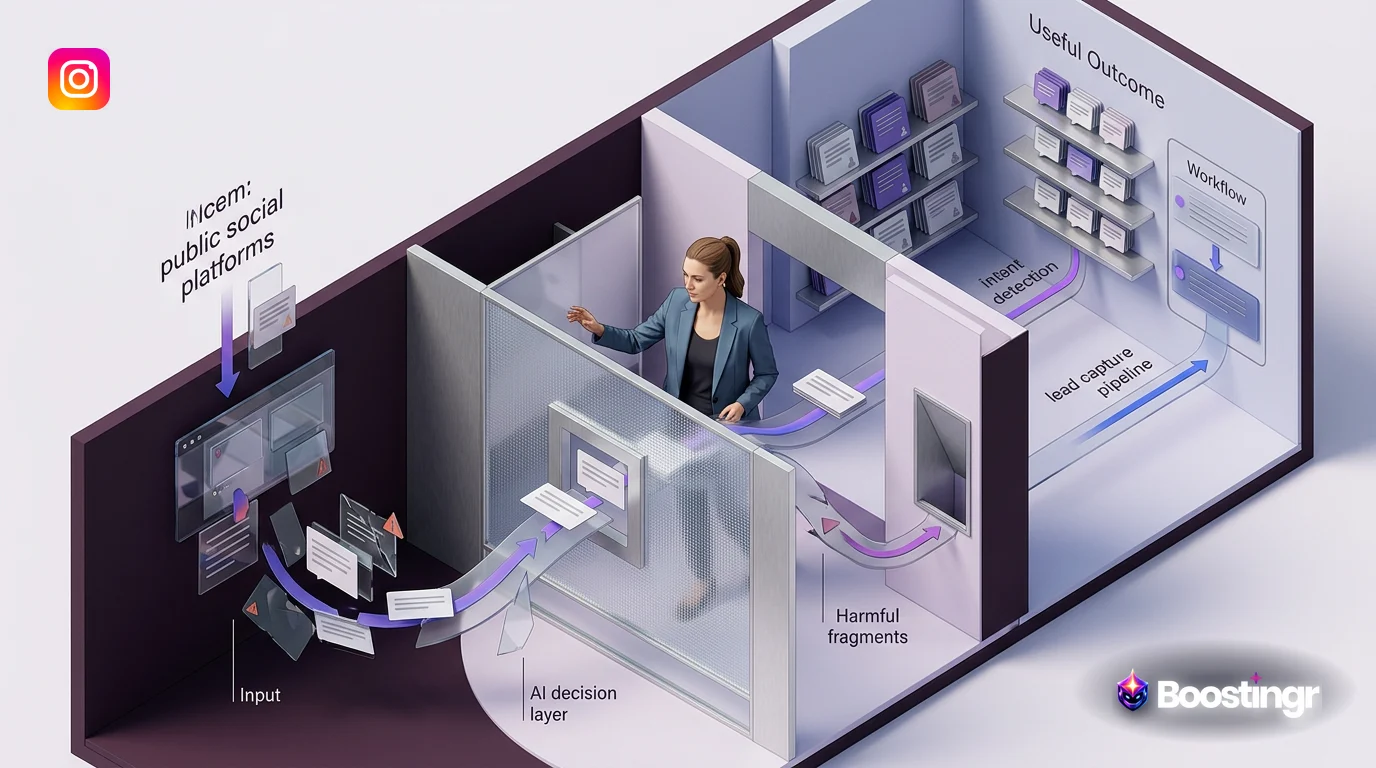
This workflow illustrates how an AI system ingests raw comments from platforms like Instagram and YouTube, processes them through various analysis stages, and routes them to the appropriate action, such as automated replies or business intelligence dashboards.
AI Decision Tree
This diagram shows how a single comment is evaluated against multiple criteria—like sentiment, keywords, and user history—to determine the correct classification and response. It's the core logic that separates a simple filter from true AI management.
Moderation Pipeline
This pipeline demonstrates how AI automatically filters comments for spam, hate speech, and policy violations, escalating only the most nuanced or severe cases to human moderators. This ensures both speed and accuracy in maintaining a safe community.
Intent Classification Flow
Go beyond simple sentiment analysis. This flow shows how the AI deconstructs comments to identify specific user intents, sorting them into valuable categories like 'Sales Lead,' 'Customer Support,' and 'Product Feedback.'
Brand Memory Diagram
The AI's 'Brand Memory' is a dynamic knowledge base that stores your brand voice, moderation rules, and product information. This diagram shows how it continuously learns from new comments and human feedback to improve its accuracy over time.
Practical Examples and Use Cases
**AI community management** isn't theoretical; it's driving real results for brands today.
* **For an Ecommerce Store:** A fast-fashion brand running an Instagram ad for a new dress is flooded with comments. The AI instantly hides spam. It auto-replies to comments like "What sizes?" with information from its Brand Memory. For comments like "I need this! Where's the link?", it replies publicly with a positive message and sends a DM with the direct product link, simultaneously flagging the user as a hot lead for the marketing team. This is the modern Facebook automation engine at work.
* **For a B2B SaaS Company:** During a new feature launch on LinkedIn, a comment asks, "How does this integrate with Salesforce?" Instead of waiting for a social media manager to see it, the AI, trained on the company's technical documentation, provides an accurate, concise answer instantly. Another comment, "We tried to sign up but got an error," is identified as a `Support Request` and automatically creates a ticket in the company's helpdesk software, assigning it to the right team.
* **For a Major Creator:** A YouTuber with millions of subscribers is overwhelmed by comments on a new video. The AI system works 24/7, deleting thousands of spam/scam comments. It identifies the most liked and engaged positive comments from verified fans and flags them for the creator to personally reply to, strengthening their community bonds while saving them hours of manual filtering.
> **First-Party Observation:** At Boostingr, we've seen that brands implementing an intent-based reply workflow for sales-related questions on their ad comments reduce their average first-response time from hours to seconds. One ecommerce client saw a **15% lift in conversions attributed to Instagram comments** within 60 days of deploying an **AI community management** system to handle their ad comment workflows.
Checklist: Implementing Your AI Community Management Strategy
Transitioning to an AI-powered system is a strategic process. Follow this checklist to ensure a smooth and successful implementation.
* [ ] **Audit Your Current State:** Analyze your current comment volume, type, and response times. Identify the biggest pain points (e.g., spam, missed leads, slow support). * [ ] **Define Brand Safety Policies:** Create clear, written rules for what constitutes spam, hate speech, or a negative comment that needs escalation. This will be the foundation for your AI moderation rules. * [ ] **Document Your Brand Voice:** Consolidate your brand's tone, style, common phrases, and personality into a single document. This will be crucial for training the AI's Brand Memory. * [ ] **Identify Key User Intents:** List the top 5-10 reasons people comment on your posts (e.g., asking for price, seeking support, giving praise, asking technical questions). * [ ] **Choose a True AI Platform:** Select a system like Boostingr that focuses on intent detection and workflow automation, not just keyword filtering. Ensure it complies with API terms of service from platforms like Meta. * [ ] **Build Initial Workflows:** Start with the most critical workflows: a robust moderation/spam filter and a workflow for your most common user intent (like sales questions). * [ ] **Train & Refine:** Launch your system and monitor its performance. Use the platform's feedback mechanisms to correct the AI and refine its understanding. The system gets smarter over time. * [ ] **Integrate & Scale:** Connect the AI to your other business tools (CRM, Slack, helpdesk) to create a seamless flow of information across your organization.
Key Takeaways
* **AI community management** is a strategic system that transforms chaotic comment sections into a source of growth, safety, and intelligence. * It moves beyond basic automation (keyword filters) to true AI understanding (intent, sentiment, and context). * The three core pillars are **AI Moderation** (safety), **AI Engagement** (humanized replies), and **Community Intelligence** (strategic insights). * A workflow-first approach using a platform like Boostingr gives you granular control to classify, route, and respond to every type of comment at scale. * The goal is not to replace humans, but to empower them by automating the repetitive 95% of comment management, freeing up teams to focus on high-value strategy and connection.
Evidence, Experience, and References
This guide is based on Boostingr's direct experience in developing AI-powered comment management solutions and processing millions of comments for brands across various industries. Our methodologies are built on a deep understanding of natural language processing (NLP), machine learning, and the technical frameworks provided by social platforms.
For further reading on platform capabilities and search engine best practices, we reference the following authoritative sources:
* Meta's Graph API Documentation: The official documentation for interacting with Facebook and Instagram data. * Google's SEO Starter Guide: Best practices for creating valuable content that search engines can understand.
About the Author
The Boostingr content team is composed of experts in AI, social media marketing, and brand strategy. With years of experience in the trenches of community management and software development, our team is dedicated to creating resources that help brands navigate the complexities of digital engagement and unlock new avenues for growth.
Last Updated
October 2023
FAQs
Search Intent and Topic Map
This guide targets readers researching ai community management and maps the topic to practical evaluation and implementation decisions. Supporting concepts include community management ai, ai powered community management, comment community intelligence, ai comment management, brand safe ai replies, comment moderation automation. These terms are used only where they clarify the reader's question, not as repeated ranking phrases.