Quick Answer
Instagram comment automation uses AI to manage public conversations on your posts. This involves automatically moderating spam and trolls, generating brand-aligned replies to common questions, identifying sales leads, and routing complex issues to human agents. The goal is to increase efficiency, engagement, and ROI while maintaining brand safety and a humanized brand presence.
The Unscalable Reality of Manual Comment Management
Your Instagram comments are a double-edged sword. On one side, they represent a goldmine of customer engagement, valuable feedback, high-intent leads, and community-building opportunities. On the other, they are a minefield of spam, repetitive questions, customer service issues, and brand-damaging negativity that can consume your social media team's entire day.
For any brand that's scaling, managing this manually becomes impossible. The sheer volume is one problem, but the expectation for rapid responses is another. According to the Sprout Social Index™, 76% of consumers will choose a brand over a competitor based on positive experiences, and rapid, helpful responses are a cornerstone of that experience. Every minute your team spends hiding spam comments or typing out the same answer about shipping policies is a minute they aren't spending on high-value strategic tasks. The opportunity cost is immense.
The cost of inaction is steep and multifaceted:
* **Missed Leads:** A comment like "Where can I buy this?" that goes unanswered for hours is a lost sale. In a competitive market, that user has likely already moved on to a competitor who was more responsive. * **Decreased Engagement:** Slow response times signal to the Instagram algorithm and your audience that you're not actively engaged. This can reduce your post's reach and discourage future comments, creating a negative feedback loop. * **Brand Damage:** Unchecked spam and troll comments create a negative, untrustworthy environment. This digital equivalent of the "broken windows theory" can drive away genuine followers and damage your brand's reputation. * **Team Burnout:** The repetitive, high-volume, and often emotionally draining nature of manual moderation is a leading cause of burnout for community managers. It turns a strategic role into a reactive, Sisyphean task. * **Inability to Scale:** You can't run more ads, launch more products, or grow your following without a plan to manage the corresponding increase in comments. Manual management is a bottleneck to growth.
This is where the conversation shifts from manual effort to intelligent systems. The solution isn't just about working harder or hiring more people; it's about implementing a smarter workflow. This is the core promise of **instagram comment automation**.
Beyond Basic Bots: What is True Instagram Comment Automation?
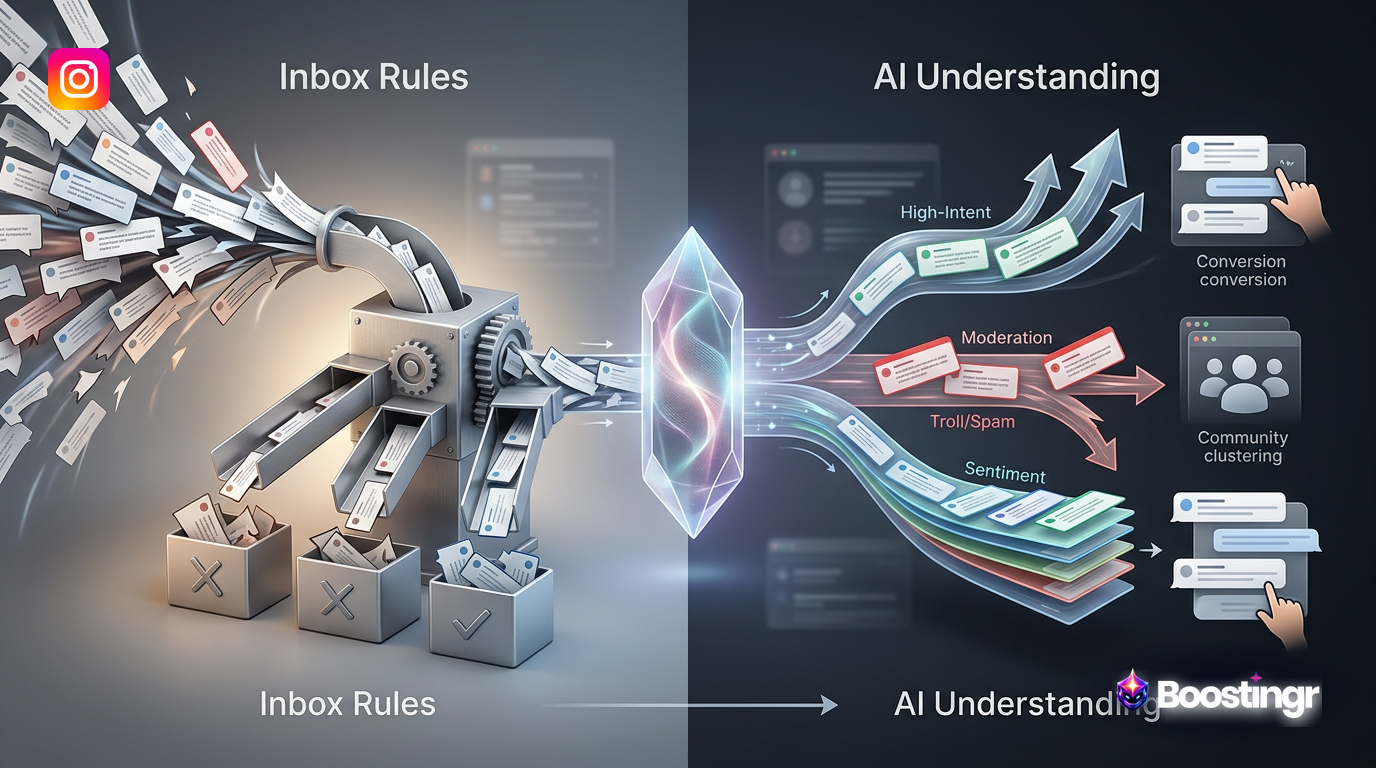
When you hear "automation," you might picture a simplistic **instagram comment bot for business** that spams generic replies based on keywords. This old approach is not only ineffective but also risky, often leading to off-brand interactions that feel robotic and can damage your reputation. True, modern **instagram comment automation** is fundamentally different. It's not about replacing humans; it's about empowering them with AI that understands context, sentiment, and intent.
Think of it as an intelligent operating system for your comments. A platform like Boostingr doesn't just *read* comments; it *understands* the people behind them using advanced Natural Language Understanding (NLU). This is the shift from basic, rule-based automation to an intelligent, workflow-first approach.
Here’s a deeper look at the difference:
* **Basic Bots:** Rely on simple `If X keyword, then Y reply` logic. They can't distinguish between sarcasm ("Great, another product I can't afford") and genuine praise ("Great product! I can't wait to afford it!"). They fail on typos and slang. They are brittle and easily broken. * **Intelligent Automation:** Uses NLU, sentiment analysis, and intent detection to understand the *meaning* behind the words. It can identify a sales lead, a customer complaint, a feature request, a spam comment, and a genuine question, even if they don't contain specific keywords. It understands nuance and context.
From our experience at Boostingr, we've seen countless brands migrate from basic keyword tools. A common failure point they report is the bot triggering on a keyword in a negative context, like replying with a happy "Thanks for the love!" to a comment that says "This product is not worth the price." This type of error is more damaging than no reply at all. Intelligent automation is designed to prevent these very mistakes. This intelligence is what allows you to build a sophisticated and brand-safe workflow that handles moderation, replies, and lead capture not just efficiently, but effectively. You can teach the AI once, and it will engage everywhere with your unique brand voice.
The Core Components of an Intelligent Comment Workflow
An effective **instagram comment automation** strategy isn't a single tool; it's a multi-stage workflow. Each stage uses AI to filter, classify, and act on comments, ensuring that every interaction is handled appropriately, with human oversight where it matters most. Let's break down this **instagram comment workflow automation** into its five essential pillars.
1. Ingestion & Classification: The First Step
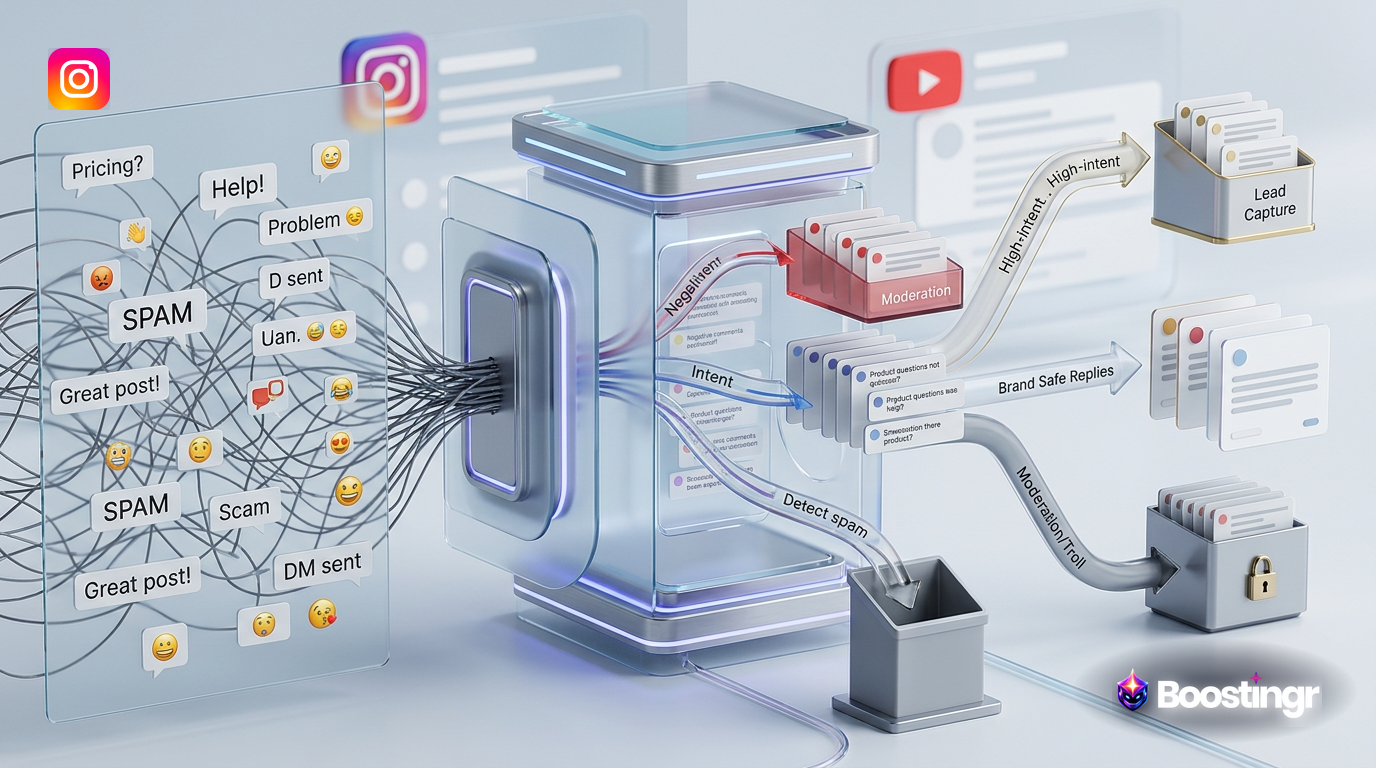
Every workflow begins with real-time ingestion. As soon as a comment is posted on your Instagram account (including on posts, ads, and Reels), it's pulled into the system via a secure webhook from the Instagram Graph API. This is where the initial, multi-layered AI analysis happens instantly. The comment isn't just seen as text; it's deconstructed and classified across several vectors:
* **Sentiment Analysis:** Is the comment positive, negative, or neutral? Advanced systems go further, identifying emotions like joy, anger, or surprise. This helps prioritize responses, flagging an angry customer for immediate human attention while queuing up positive comments for appreciative replies. * **Intent Detection:** What does the user *want*? This is the most critical classification. The AI determines if the comment expresses one of dozens of possible intents, such as `purchase_intent`, `customer_support_issue`, `pre-sale_question`, `feature_request`, `competitive_mention`, `spam`, or simple `praise`. This classification is the foundation for all subsequent routing. * **Spam/Troll Detection:** The system uses advanced pattern recognition, historical user data, and content analysis to identify and flag spam, hate speech, or trolling. This goes far beyond simple keyword filters, catching sophisticated scams that use unicode characters or subtle phrasing. * **Entity Recognition:** The AI can identify specific products, services, or campaign names mentioned in the comment, adding another layer of context for generating a relevant reply.
2. AI-Powered Moderation: Your First Line of Defense
With comments classified, the moderation pipeline kicks in. This is your brand's automated, 24/7 shield. Based on rules you define in a platform like Boostingr, the system can take immediate, precise action:
* **Auto-Hide/Delete:** Automatically hide or delete comments that are identified with high confidence as spam, scams, profanity, or hate speech. This keeps your comment section clean without any manual intervention, often before most of your audience ever sees the offending content. * **Flag for Review:** Comments that are potentially negative, sarcastic, or from known trolls can be automatically flagged and placed in a special queue for a human moderator to review. This prevents the AI from making a judgment call on a nuanced, sensitive issue, blending the speed of AI with the wisdom of human oversight. * **Restrict User:** For repeat offenders, the system can be configured to automatically apply an Instagram 'Restrict' action, making their future comments visible only to themselves and your team, effectively neutralizing their ability to disrupt the community. * **Allow:** Positive and neutral comments from trusted followers can be automatically approved, keeping the conversation flowing without delay.
At Boostingr, our data shows that brands using intelligent moderation to automatically hide spam and troll comments within the first 60 seconds see a measurable increase in positive sentiment on subsequent comments within the same thread. It proves that a clean environment actively fosters more positive conversation. This is the core of a powerful AI comment moderation workflow.
3. Intelligent Routing & Triage
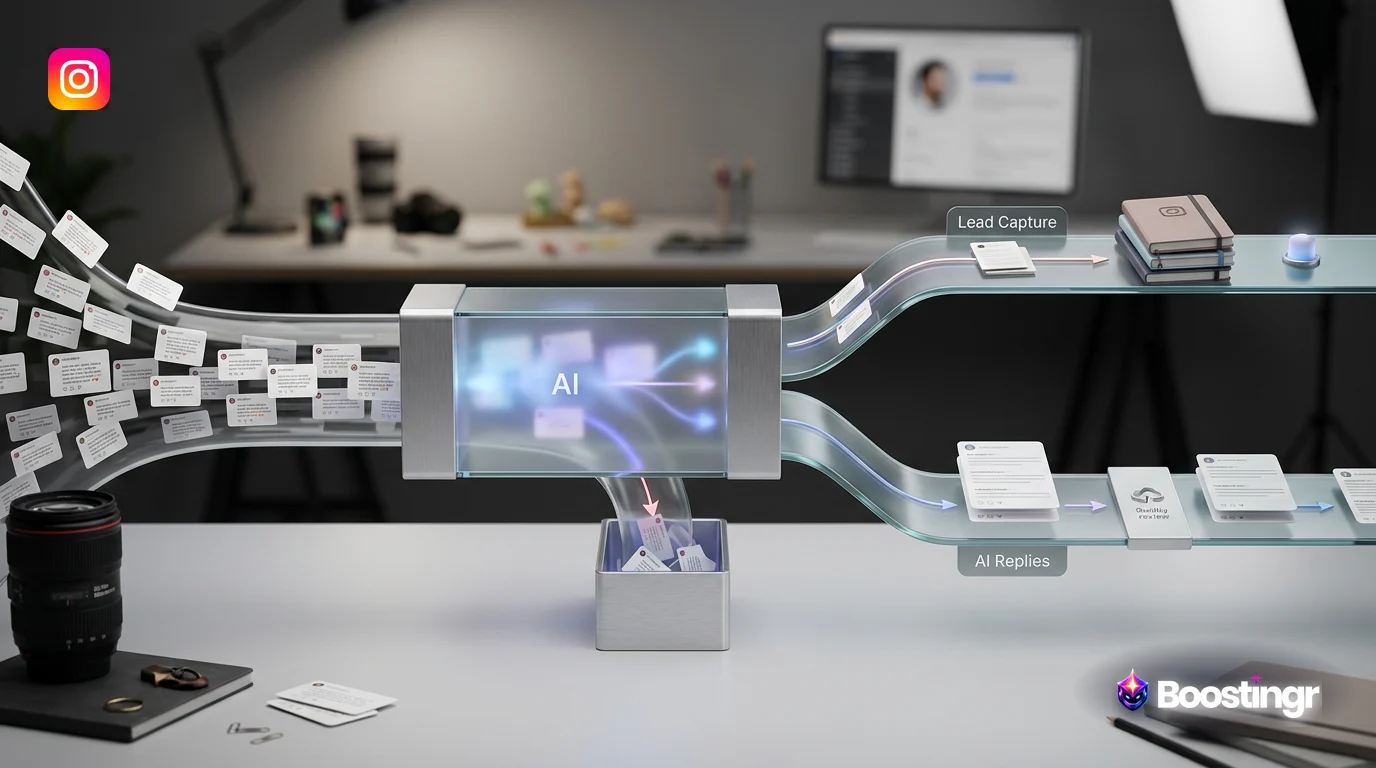
Once a comment is moderated, it needs to go to the right place. This is where intelligent routing transforms your team's efficiency. Instead of a single, chaotic inbox where sales leads are mixed with support tickets and spam, comments are triaged into specific, actionable workflows:
* **Sales Leads:** Comments with `purchase_intent` ("How much is this?", "Is the blue one in stock?") are routed directly to a lead capture workflow or a dedicated sales team dashboard. * **Customer Support:** Negative sentiment comments or direct questions about order issues (`post-sale_issue`) are sent to a customer service queue, often integrating directly with helpdesk software like Zendesk or Gorgias. * **Engagement Team:** Positive comments and genuine, non-transactional questions are routed to community managers for personalized engagement, allowing them to focus on building relationships. * **AI Reply Queue:** Simple, repetitive questions (`pre-sale_question` like shipping policies) are sent to the AI reply engine for an automated response. * **Product Feedback:** Comments identified as a `feature_request` or product feedback can be routed to a product team's Slack channel or project management tool.
This process ensures that the right eyes are on the right comment at the right time, eliminating the manual sorting that plagues so many teams. You can explore how these connections work on our integrations page.
4. Automated Instagram Comment Replies with Brand Memory
This is where the magic of AI-powered engagement shines. For the comments routed to the AI reply queue, the system can generate and post **automated instagram comment replies**. But these aren't the generic, robotic replies of old bots. A platform like Boostingr uses a concept called Brand Memory.
Brand Memory is a centralized knowledge base that you create and control. You teach the AI your:
* **Brand Voice & Tone:** Provide examples of your communication style—are you witty and casual, or professional and formal? Define words to use and words to avoid. * **Product & Service Catalog:** Upload details about your products, including specs, pricing, availability, and links. * **Frequently Asked Questions (FAQs):** Input answers to common questions about shipping, returns, ingredients, store hours, etc. * **Policies & Boundaries:** Define what the AI is and is not allowed to talk about. For example, it should never give medical advice or comment on legal matters.
The AI uses this knowledge base to craft replies that are not only accurate but also perfectly on-brand. It can answer questions like:
* "Do you ship to Canada?" * "Is this vegan and cruelty-free?" * "When is your next restock for the limited edition?"
Each reply is contextual, humanized, and consistent. You can set confidence thresholds, so the AI only replies when it's over 95% certain of the answer, leaving more complex queries for your team. This is the core of a true AI Instagram reply bot that works as a partner to your team, not a clumsy replacement.
5. Lead Capture & Opportunity Identification
Perhaps the most valuable part of this workflow is its ability to turn comments into revenue. The AI's intent detection is specifically trained to identify buying signals, a key component of effective social selling. When a user comments, "I need this!" or "Can I get this in a size medium?", the system triggers a lead capture workflow.
This can take several forms, all automated:
* **Automated DM Conversation:** The system can automatically send the user a DM with a direct link to the product page, and even ask follow-up questions to help them complete the purchase. * **CRM Integration:** The user's information, comment text, and the detected purchase intent can be automatically sent to your CRM (like Salesforce or HubSpot) as a new, high-quality lead, complete with social context. * **Sales Team Alert:** A real-time notification can be sent to your sales team via Slack or email with a link to the comment, allowing for immediate, personal follow-up on a hot lead.
This proactive Instagram lead capture process closes the loop between social engagement and sales, proving the direct ROI of your community management efforts in a way that was previously impossible to track at scale.
Building Your Instagram Comment Automation Workflow with Boostingr
Setting up this powerful workflow is more straightforward than you might think. Here’s a practical, step-by-step guide to implementing it using a workflow-first platform like Boostingr.
**Step 1: Connect Your Instagram Account**
First, you'll securely connect your Instagram Business or Creator account via the official Meta API. This is a non-negotiable step for security and functionality. It uses a secure OAuth 2.0 flow, meaning you never share your password. This grants the platform the necessary permissions to read and manage comments on your behalf, in full compliance with Instagram's terms of service.
**Step 2: Configure Your Moderation Rules**
This is where you define your brand's safety net. In your Boostingr dashboard, you'll set up rules for the AI moderation engine using a simple, visual editor. For example:
* **Rule 1 (Spam):** `IF (intent_is = 'Spam' with confidence > 95%) OR (comment_contains_word_from = 'Scam Keyword List') THEN action = 'Hide Comment'` * **Rule 2 (Hate Speech):** `IF intent_is = 'Hate Speech' with confidence > 90% THEN action = 'Hide Comment' AND action = 'Restrict User'` * **Rule 3 (Negative Sentiment):** `IF sentiment = 'Negative' with confidence > 80% THEN action = 'Route to Support Queue'`
These rules form the foundation of your automated community safety.
**Step 3: Teach Your Brand Memory**
This is the most critical step for humanized replies. You'll populate your Brand Memory with essential information. Start with your top 10 most frequently asked questions. Then add product details, company info, and tone-of-voice guidelines. A good practice is to review your 'unanswered' comments from the past month and add them to the Brand Memory. Over time, this becomes a comprehensive brain for your brand's public communication, which the AI helps you maintain and expand.
**Step 4: Define Your Reply & Routing Logic**
Now, you combine your Brand Memory with reply triggers. You create rules that dictate when, how, and if the AI should reply.
* **Rule 1 (Shipping Question):** `IF intent_is = 'Shipping Inquiry' AND confidence > 95% THEN generate_reply_using = 'Shipping Policy FAQ' AND post_reply` * **Rule 2 (Positive Feedback):** `IF sentiment = 'Positive' AND contains_no_question THEN generate_reply_using = 'Thank You Templates' AND post_reply_with_delay = '90 seconds'` * **Rule 3 (Complex Question):** `IF intent_is = 'Product Inquiry' AND confidence < 90% THEN action = 'Route to Community Manager'`
This level of control ensures you automate the predictable while escalating the nuanced, maintaining a perfect balance of efficiency and personalization.
**Step 5: Set Up Lead Capture Triggers**
Finally, you'll configure the triggers that turn comments into cash.
* **Trigger 1 (Purchase Intent):** `IF intent_is = 'Purchase Intent' THEN action = 'Send Product Link via DM' AND action = 'Create Lead in HubSpot'` * **Trigger 2 (Price Inquiry):** `IF comment_contains = 'How much?' OR intent_is = 'Price Inquiry' THEN action = 'Send Pricing Page Link via DM' AND action = 'Notify #sales-leads on Slack'`
With these five steps, you've built a comprehensive, intelligent, and scalable **instagram comment automation** machine that works for you 24/7. You can explore our pricing plans to see how this workflow can fit your brand's needs.
Comparison Table
Not all automation is created equal. Here’s a high-level comparison between basic, keyword-based tools and an intelligent, workflow-first platform like Boostingr.
| Feature | Basic Automation (e.g., Inbox Rules) | Intelligent Automation (Boostingr) |
|---|---|---|
| **Trigger Mechanism** | Simple keyword matching (e.g., "price") | AI-powered Intent Detection (understands "how much is this" and "what's the cost") |
| **Reply Generation** | Fixed, static templates | Dynamic, contextual replies generated from Brand Memory |
| **Moderation** | Keyword blocklists (hides "spam") | AI Spam & Troll Detection (understands context, hides sophisticated spam) |
| **Lead Identification** | Manual review or keyword-based | Automatic Purchase Intent Detection and lead routing |
| **Human Escalation** | All-or-nothing; either automates or doesn't | Intelligent routing to human agents based on sentiment, confidence, and rules |
| **Analytics & Reporting** | Basic counts of replies sent | In-depth analytics on comment trends, sentiment, intent, and team performance |
| **API Compliance** | Varies; some use risky, unofficial methods | Built on the official, secure Instagram Graph API |
| **Adaptability** | Requires constant manual updating of rules | Learns and improves over time through AI model training |
| **Core Philosophy** | Inbox management and simple replies | Full-funnel community management and intelligent social media comment automation |
Practical Examples and Use Cases
Theory is great, but how does this look in practice? Here are some real-world scenarios where an intelligent comment workflow shines.
Use Case 1: Ecommerce & D2C Brands
An apparel brand posts a new jacket. The comments flood in: * "OMG I need this! 😍" * "how muhc is it?" * "Is this real leather or vegan?" * "Do you ship to Australia?" * "[SPAM] Check out my profile for free followers!" * "I ordered last week and my package is lost!"
**The Boostingr Workflow:**
- The spam comment is instantly and automatically hidden.
- The comment about the lost package is identified by its negative sentiment and `post-sale_issue` intent. It's immediately routed to the Zendesk integration, creating a high-priority support ticket.
- The "how muhc is it?" (with typo) and "Do you ship to Australia?" comments receive instant, accurate public replies generated from Brand Memory. The AI also sends a DM to each user with a direct link to the product and shipping info page.
- The "I need this!" comment is identified as high purchase intent. The user receives a friendly DM: "We're so glad you love it! You can grab the jacket here before it sells out," with a link. This interaction is logged as a lead in the brand's Shopify account.
- The "Is this real leather or vegan?" question, being more nuanced and related to brand values, is routed to a human community manager for a personalized, thoughtful response.
Use Case 2: The Creator Economy
A popular fitness creator posts a new workout video. The comments are a mix of encouragement, questions, and unfortunately, trolls. * "Great workout! Feeling the burn! 🔥" * "What song is this?" * "You're doing that exercise wrong, you're going to hurt someone." * "Your form is terrible lol"
**The Boostingr Workflow:**
- The "terrible lol" comment is identified as non-constructive trolling and is automatically hidden.
- The "Great workout!" comment receives an automated, encouraging reply that matches the creator's energetic tone: "Awesome job! So glad you enjoyed it, keep up the great work! 💪"
- The "What song is this?" comment, a common and repetitive question, gets an instant AI reply: "The song is 'Energy' by Power Up! It's on our public workout playlist, link in bio!"
- The comment about "doing that exercise wrong" is flagged for its negative sentiment and potentially legitimate concern. It's routed to the creator for review, allowing them to decide whether to address it with a helpful correction or dismiss it.
Use Case 3: B2B SaaS Companies
A SaaS company posts a demo video of a new feature for their project management tool. * "This looks amazing!" * "Does this integrate with Slack?" * "We were just talking about needing something like this. Is there a free trial?" * "How is this different from Asana?"
**The Boostingr Workflow:**
- The "Does this integrate with Slack?" question is answered automatically by the AI, which pulls the information from the Brand Memory's integration list.
- The comment "We were just talking about needing something like this. Is there a free trial?" is flagged as a high-quality lead. The AI sends an immediate DM: "It sounds like a perfect fit! You can start a free 14-day trial here [link]. Let us know if you have any questions getting set up!" Simultaneously, a new lead is created in the company's Salesforce instance with the user's details and the original comment.
- The competitive question, "How is this different from Asana?", is identified as `competitive_mention` and routed to the marketing or sales team. This is a high-value conversation that requires a nuanced, strategic human response, not an automated one.
These use cases demonstrate the power of a workflow that automates the mundane, accelerates the valuable, and escalates the critical. Explore more at our Instagram comment automation use case page.
Mini Case Study: How a D2C Brand Increased Lead Capture by 300%
**Client:** "Aura Living," a fast-growing direct-to-consumer home decor brand.
**Problem:** Aura Living's aesthetic posts and targeted ad campaigns generated thousands of comments per week. Their two-person social media team was overwhelmed. High-intent comments like "Where can I get this lamp?" were getting buried under spam and general questions about shipping, leading to lost sales and a chaotic brand image.
**Solution:** They implemented Boostingr's **instagram comment automation** workflow.
- **Moderation:** They set up rules to auto-hide over 98% of spam and profanity, cleaning up their comment sections instantly.
- **AI Replies:** They populated their Brand Memory with product dimensions, material information, shipping policies, and return instructions. The AI began handling ~60% of all questions within 90 seconds.
- **Lead Capture:** They created a workflow where any comment with purchase intent (e.g., "need this," "how much," "where to buy") triggered an automated DM with a product link and created a lead in their Shopify backend.
**Results:** * Within the first month, Aura Living saw a **300% increase** in leads captured directly from Instagram comments, as tracked in their ecommerce analytics. * Their team's time spent on manual moderation **dropped by 85%**, allowing them to focus on creating better content and engaging in more meaningful conversations. * Their public response time for common questions went from an average of 6 hours to **under 2 minutes**. * **Quote from their Head of Social:** "Boostingr didn't just clean up our comments; it turned them into a predictable revenue channel. We're no longer afraid to scale our ad spend because we know we have a system that can handle the volume and capture every single lead."
This is a prime example of how an AI community management system can deliver tangible business results.
The Role of the Instagram Graph API
It's critically important to understand the technology that makes this all possible and safe. True **instagram comment automation** platforms like Boostingr are built on the official Instagram Graph API, which is part of the broader Facebook Graph API. As a Meta Business Partner, Boostingr uses this as the only legitimate and sanctioned way for third-party applications to interact with Instagram data.
Using the official API ensures:
* **Security:** Your account credentials are safe. You authorize the application through a secure OAuth flow, never by sharing your password. This prevents account hijacking. * **Compliance:** The platform operates within the rules set by Meta. This protects your account from being flagged, suspended, or banned, a real risk with unofficial, scraping-based bots. * **Reliability:** The API provides a stable, reliable, real-time connection for comment ingestion and response, which is essential for timely moderation and replies. * **Future-Proofing:** As Instagram updates its platform, API-based tools are updated in tandem, ensuring continued functionality.
Any tool that asks for your Instagram password, requires you to install a browser extension, or doesn't use the official API should be avoided at all costs. The risk to your account and brand reputation is not worth it. Learn more about staying safe with Instagram's API.
Checklist: Is Your Brand Ready for Instagram Comment Automation?
Use this checklist to determine if an intelligent workflow is the right next step for your brand.
- [ ] **High Comment Volume:** Do you receive more comments than your team can comfortably handle in a timely manner (e.g., >50-100 per day)?
- [ ] **Repetitive Questions:** Does your team spend a significant amount of time copying and pasting answers to the same questions about your products, services, or policies?
- [ ] **Spam & Trolling Issues:** Is your comment section frequently targeted by spam, scams, or negative trolling that requires constant manual cleanup?
- [ ] **Missed Sales Opportunities:** Do you suspect you're missing sales leads or important customer feedback in the noise of your comment threads?
- [ ] **Need for 24/7 Presence:** Do you have a global audience or run ads around the clock, requiring timely responses and moderation outside of your team's standard working hours?
- [ ] **Desire to Scale Growth:** Are you planning to grow your social media presence, run more ads, or launch new products and anticipate a corresponding increase in comments?
- [ ] **Focus on Strategic Work:** Do you want to free up your community managers to focus on strategy, content creation, and high-value engagement rather than repetitive, low-impact tasks?
- [ ] **Data-Driven Strategy:** Do you want to gain insights into what your customers are asking about most, what their sentiment is, and how your comment section drives business results?
If you checked three or more of these boxes, it's time to seriously consider implementing an **instagram comment automation** workflow. You can sign up for a demo to see how it would work for your specific brand.
Key Takeaways
* **Modern automation is intelligent:** It's not about basic bots. True **instagram comment automation** uses AI to understand sentiment, intent, and context, enabling sophisticated, brand-safe workflows. * **It's a workflow, not just a tool:** The most effective approach involves a multi-stage process: Ingestion, Classification, Moderation, Routing, Replying, and Lead Capture. * **Brand safety is paramount:** AI-powered moderation automatically cleans your comment sections 24/7, while rule-based routing ensures sensitive issues are always handled by humans. * **Humanization is the goal:** With Brand Memory, AI-generated replies can be perfectly on-brand, accurate, and context-aware, enhancing the customer experience and freeing up humans for more meaningful connection. * **It drives measurable ROI:** By automating lead capture, improving response times, and providing deep analytics, an intelligent comment workflow directly contributes to sales and customer loyalty. * **Empower, don't replace:** The goal is to augment your human team, transforming their roles from reactive moderators to strategic community builders.
Original Diagrams
These original visuals explain the workflow in a faster, more defensible format than plain text alone and give the article first-party assets that are easier to understand and harder to copy.
Comment Processing Workflow
This diagram illustrates the end-to-end journey of an Instagram comment within an intelligent automation system. It shows how each comment is received, analyzed, and routed for the appropriate action, from a simple reply to escalation.
AI Decision Tree
See how the AI brain makes decisions for each comment. This decision tree visualizes the logic, showing how the system determines whether a comment is a question, a lead, spam, or needs human review.
Moderation Pipeline
This pipeline demonstrates the multi-layered approach to automated comment moderation. It shows how comments pass through successive filters to automatically hide or delete spam, trolls, and harmful content, ensuring brand safety.
Intent Classification Flow
Understanding user intent is key to effective automation. This flow shows how the AI analyzes the language of a comment to categorize it as a sales opportunity, a support request, positive feedback, or a general question.
Brand Memory Diagram
An intelligent system needs a brain, and this is its brand-specific memory. This diagram shows how the AI accesses a central knowledge base—containing FAQs, product details, and brand voice guidelines—to craft relevant and consistent responses.
Evidence, Experience, and References
This article is based on the collective experience of the Boostingr team, which has developed and implemented AI-powered comment management systems for hundreds of brands across e-commerce, media, and the creator economy. As a Meta Business Partner, our insights are derived from analyzing millions of public comments and observing the tangible impact of workflow automation on brand engagement, efficiency, and revenue. All technical capabilities described are grounded in our platform's features and are compliant with the official APIs provided by Meta. Our content strategy adheres to best practices for creating helpful, reliable, people-first content, as outlined in guides like Google's SEO Starter Guide.
About the Author
The Boostingr content team is composed of social media strategists, AI specialists, and community management experts. With years of hands-on experience managing brand communities and developing AI solutions, our team is dedicated to creating resources that help brands navigate the complexities of digital engagement and turn public conversations into growth opportunities.
Last Updated
October 2023
FAQs
Search Intent and Topic Map
This guide targets readers researching instagram comment automation and maps the topic to practical evaluation and implementation decisions. Supporting concepts include automated instagram comment replies, instagram comment workflow automation, instagram comment bot for business, ai comment management, brand safe ai replies, comment moderation automation. These terms are used only where they clarify the reader's question, not as repeated ranking phrases.