Quick Answer
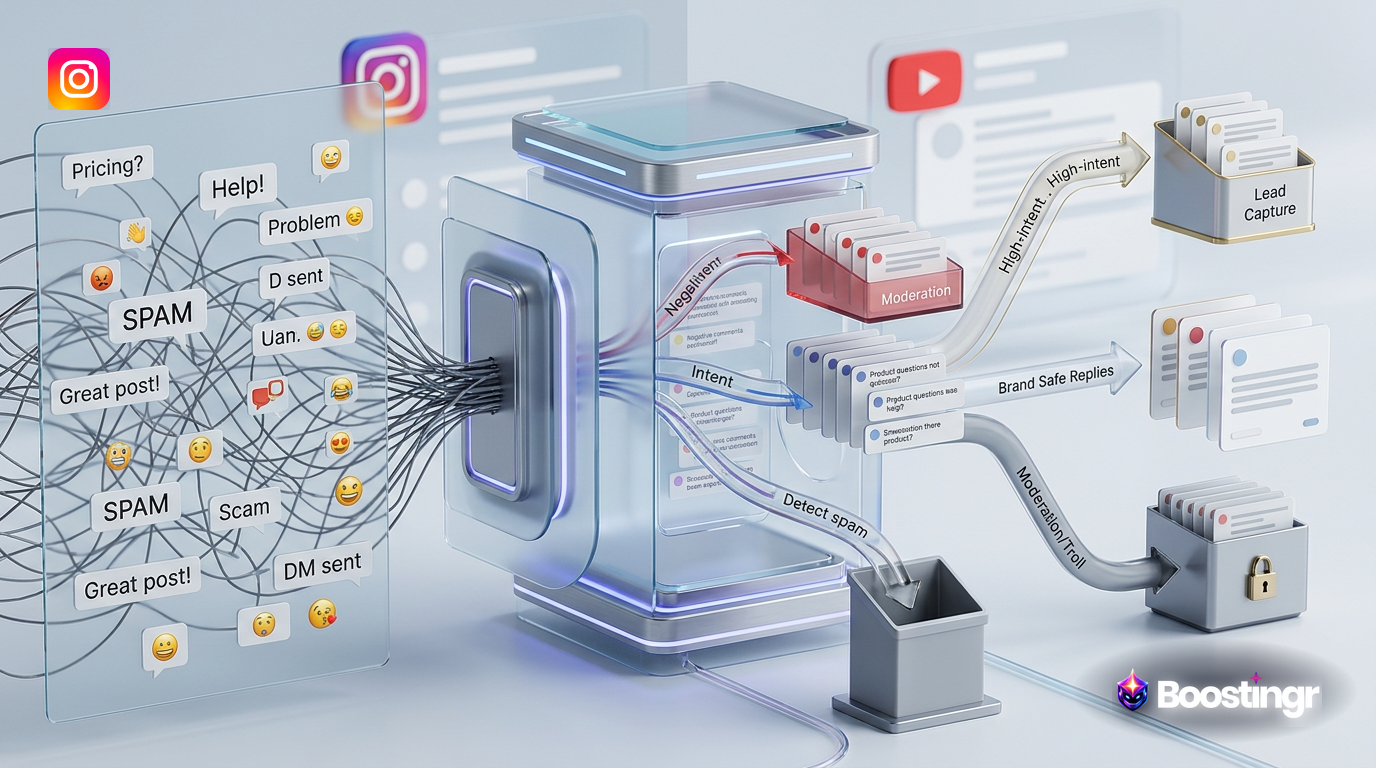
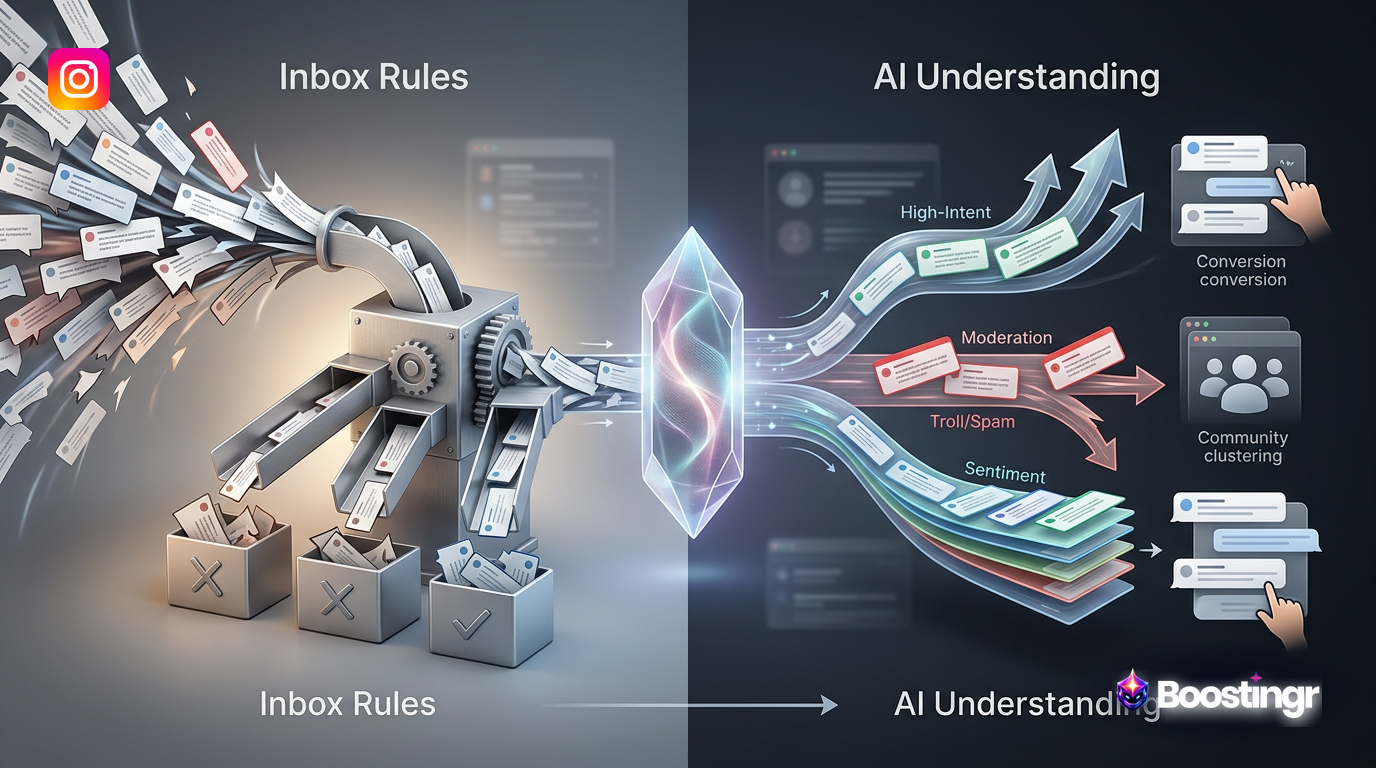
An AI community management system uses artificial intelligence to create integrated workflows for handling social media comments at scale. It goes beyond basic automation by understanding comment sentiment and intent to intelligently moderate content, generate humanized replies, identify sales leads, and provide deep community intelligence, all within a unified platform.
Introduction
Your social media comments are a firehose of customer feedback, sales opportunities, support requests, and brand sentiment. For years, community managers have tried to tame this flow with manual effort and basic automation tools. But the reality is, these methods are breaking under the sheer weight of modern digital conversation.
This is where a true **AI community management** system changes the game. It's not about adding another bot or a simple auto-reply tool. It's about implementing a cohesive, intelligent system with interconnected workflows that manage the entire lifecycle of a comment—from the moment it's posted to the insight it generates.
Boostingr is the operating system for this new era. It doesn't just read comments; it understands the people and the intent behind them. By building intelligent workflows for moderation, engagement, and growth, you can transform your comment section from a chaotic liability into your most valuable strategic asset.
Why This Topic Matters
The digital town square is more crowded than ever. With a vast majority of U.S. adults using platforms like YouTube and Facebook, as documented by the Pew Research Center, the sheer volume of user-generated content is staggering. This isn't a uniform flood; it's a series of distinct, challenging torrents. On Instagram, comments are tied to visual context, making text-only analysis insufficient. On TikTok, trends and slang evolve overnight, rendering static keyword lists obsolete in days. On YouTube, comments can be long-form discussions or drive-by trolling. On Facebook, they are a mix of community support and heated debate. Managing this requires more than just manpower; it requires specialized intelligence.
Simple keyword-based tools can't distinguish between sarcasm and genuine praise. They miss purchase intent hidden in casual questions. They require endless rule-building and still let trolls and spam slip through. The result? Missed leads, frustrated customers, brand safety risks, and a community management team on the verge of burnout. This burnout is a significant, often hidden cost. Community managers are on the front lines, absorbing negativity and toxicity that can have real mental health consequences. This leads to high turnover in a role that is crucial for brand perception. From a business perspective, the cost is even clearer. Every missed sales question is lost revenue. Every unanswered customer complaint is a churn risk. Every piece of spam that stays live undermines brand credibility. The 'cost of doing nothing' or relying on outdated tools is no longer a rounding error; it's a direct hit to the bottom line.
The Failure of Traditional Comment Management
For too long, the approach to comment management has been reactive and fragmented. Let's break down why legacy methods are no longer sufficient for modern brands.
* **Manual Moderation:** The most basic approach is also the least scalable. A human moderator reading every single comment is simply not feasible for any brand with a significant following. It's slow, expensive, and prone to human error and burnout, especially when dealing with a constant stream of toxic content. * **Keyword-Based Automation:** Tools that hide or reply to comments based on specific keywords were a step up, but they are fundamentally flawed. They lack context. A filter for the word "sucks" might hide a legitimate customer complaint you need to see, while a spammer can easily bypass it with clever misspellings (e.g., "súcks"). This approach is brittle and requires constant maintenance. * **Fragmented Social Media Suites:** Many large platforms like Hootsuite or Sprout Social offer comment management, but it's often an add-on to a broader suite of publishing and listening tools. Their automation capabilities tend to be rule-based and lack the sophisticated AI needed for deep understanding. You can build inbox rules, but you can't build a truly intelligent, self-improving system that understands nuance like sentiment and purchase intent. You're still stuck in the world of if/then statements, not true **AI community management**.
These outdated methods force your team to spend 90% of their time fighting fires—deleting spam and dealing with trolls—and only 10% on high-value activities like engaging with fans and identifying leads. An AI-powered workflow inverts this ratio.
The Core Components of an AI Community Management System
A robust **AI community management** system is built on several interconnected pillars that work together to create seamless workflows. It's a pipeline that processes every comment with layers of intelligence. Boostingr integrates these components into a single, powerful operating system.
1. Ingestion & Classification Engine
Everything starts with data ingestion. A true system connects directly to social media platform APIs, like the Instagram Graph API, to pull in every comment in real-time. As soon as a comment is ingested, the classification engine gets to work. This isn't just a keyword scan; it's a multi-layered analysis that categorizes each comment based on:
* **Spam & Bot Detection:** Identifies and isolates junk comments. This goes beyond simple blocklists to understand the behavioral patterns of spam accounts, a core principle of intelligent spam comment detection. * **Troll & Hate Speech Detection:** Flags harmful or abusive content based on nuanced understanding, not just a list of bad words. * **Sentiment Analysis:** Determines if the comment is positive, negative, or neutral. This allows for powerful prioritization, ensuring your team addresses negative comments first. A deep dive into this topic can be found in our guide to sentiment analysis for social media comments. * **Intent Detection:** The most crucial layer. It identifies the *purpose* behind the comment. This goes far beyond simple categories. A sophisticated intent model can differentiate between: High-Intent Purchase Questions ("How much is this?"), Pre-Purchase Research ("Does this work with X?"), Post-Purchase Support ("My order is late"), Feature Requests, and Competitor Mentions. Understanding this nuance is the foundation of an effective workflow. You can learn more in our Ultimate Guide to Intent Detection for Comments.
2. The AI-Powered Moderation Workflow
Once a comment is classified, it enters the moderation workflow. This is where you can enforce your community guidelines at scale with an **ai comment moderation workflow**. Instead of manually hiding comments, you build automated rules based on the AI's classification.
* **Auto-Hide/Delete:** Automatically remove comments classified with high confidence as spam, hate speech, or severe policy violations. * **Quarantine for Review:** Comments that are borderline or flagged as trolling can be placed in a separate queue for a human moderator to review. This keeps your main feed clean while ensuring you don't accidentally delete a valid customer complaint. * **Human-in-the-Loop:** The system learns from your team's actions. When a moderator corrects the AI's decision, that feedback is used to retrain the model, making it smarter over time.
3. Intelligent Triage & Reply Workflows
This is where **AI community management** moves beyond simple moderation and into proactive engagement. Based on the intent and sentiment analysis, the system automatically routes comments into different workflows.
* **Sales Lead Workflow:** A comment like "Do you have this in black?" is identified as purchase intent and can trigger an automated reply and DM, while simultaneously notifying the sales team. * **Customer Support Workflow:** A comment like "My order hasn't arrived" is flagged as a support issue and can be routed to your support desk or trigger a reply asking the user to check their DMs for assistance. * **Engagement Workflow:** Positive comments and questions from fans are prioritized in an engagement queue, allowing your community managers to focus on building relationships.
**First-Party Observation:** From our experience at Boostingr analyzing billions of comments, we see a clear pattern: for e-commerce clients, 'purchase intent' and 'product questions' consistently make up over 30% of all non-spam, actionable comments. For B2B SaaS companies, 'integration questions' and 'demo requests' are the most valuable, yet often missed, intents. This data confirms that for most brands, a significant portion of their potential revenue and product feedback is hiding in plain sight within their comment sections.
4. Humanized AI Replies with Brand Memory
Generic, robotic auto-replies are a hallmark of bad automation. A sophisticated system uses **brand safe AI replies** powered by Brand Memory. With Boostingr, you "Teach once, engage everywhere." This isn't just a database of canned responses. **Brand Memory for AI Replies** is a dynamic knowledge base that the AI consults in real-time. The process involves:
- **Knowledge Ingestion:** You provide documents, website URLs, help center articles, and spreadsheets containing product specs, policies, and FAQs.
- **Voice & Tone Calibration:** You provide examples of 'good' and 'bad' replies, allowing the AI to learn the stylistic nuances of your brand—use of emojis, level of formality, and sense of humor.
- **Boundary Setting:** You define 'guardrails'—topics the AI should never discuss, competitors it shouldn't mention, and escalation paths for sensitive issues.
This creates a system that can handle unforeseen questions with accuracy and brand safety. The goal is to build a complete system for brand safe AI replies, including governance and control. For ultimate control, you can set up workflows where the AI drafts a reply and holds it for human approval before posting. This combines the speed of AI with the safety of human oversight.
5. The Community Intelligence Layer
Finally, a true system aggregates all this data into actionable insights. The comment section becomes a real-time focus group. A Community Intelligence dashboard reveals:
* **Sentiment Trends:** Is customer sentiment improving or declining over time? What campaigns are driving positive conversation? * **Top Topics & Questions:** What are people asking about most? This can inform your content strategy, product development, and FAQ pages. * **Lead Generation Metrics:** Track how many leads are being identified and captured directly from your comments.
This is the essence of AI community intelligence for comments, turning raw data into a strategic growth engine.
Comparison Table
Understanding the difference between a true **AI community management** system and other tools is crucial. Here’s a high-level comparison:
| Feature | Basic Automation (e.g., Keyword Tools) | Social Media Suites (e.g., Sprout, Hootsuite) | AI Community Management System (e.g., Boostingr) |
|---|---|---|---|
| **Core Logic** | If/Then Keyword Matching | Inbox Rules & Basic Filtering | AI-driven Semantic Understanding |
| **Moderation** | Hides comments with specific words. Easily bypassed. | Manual moderation in a unified inbox. Some keyword rules. | Nuanced detection of spam, trolls, and hate speech with auto-actions. |
| **Replies** | Generic, one-size-fits-all auto-replies. | Canned responses. Manual replies. | Context-aware, humanized AI replies powered by Brand Memory. |
| **Intent Detection** | None. Treats all comments equally. | Limited to basic keyword triggers. | Natively identifies purchase intent, support questions, praise, etc. |
| **Workflow** | Single-step actions (e.g., hide comment). | Manual routing and tagging by users. | Automated, multi-step workflows for moderation, replies, and lead capture. |
| **Intelligence** | Basic counts of hidden comments. | High-level brand mentions and sentiment (often for the whole account). | Deep comment-level intelligence on sentiment, topics, and intent trends. |
| **Scalability** | Breaks down as rule lists grow. | Relies on adding more human moderators. | Scales effortlessly with comment volume, continuously learning. |
Building Your AI Comment Moderation Workflow
Setting up an effective **ai comment moderation workflow** is the foundational step in taking control of your community. It’s a systematic process of defining rules, configuring AI, and establishing clear protocols.
**First-Party Observation:** At Boostingr, we've observed that brands moving from basic keyword filters to a full **AI community management** system see a 70% reduction in manual moderation time within the first 30 days. This is because the AI handles not just obvious spam, but nuanced policy violations that keyword rules miss.
Here’s how to build your workflow in a platform like Boostingr:
- **Step 1: Define Your Community Guidelines:** What is and isn't acceptable? Be specific about spam, hate speech, harassment, and off-topic content. This document becomes the source of truth for both your human team and the AI. It should be a living document, updated as new situations arise.
- **Step 2: Configure AI Classifiers:** In your Boostingr dashboard, you'll set the sensitivity for different categories. For example: **Spam:** Set to 'High Confidence' -> Action: 'Auto-Delete'. **Hate Speech:** Set to 'High Confidence' -> Action: 'Auto-Hide & Ban User'. **Trolling:** Set to 'Medium Confidence' -> Action: 'Add to Review Queue'. This initial setup is a baseline. The real power comes from observing the 'Review Queue' and adjusting sensitivities based on the AI's real-world performance on your content.
- **Step 3: Create Routing Rules:** Go beyond simple hiding. Create rules that use the AI's output. For example, a comment with 'Negative' sentiment and 'Support' intent should be automatically tagged and assigned to the customer support team's queue. You can build more complex rules, such as 'If comment contains purchase intent AND mentions a specific product SKU, tag for 'High-Priority Sales' and notify the product specialist team via Slack.' This level of granularity is covered in our playbook for AI comment moderation.
- **Step 4: Establish Human-in-the-Loop Escalation:** Define the process for the 'Review Queue'. A community manager reviews the flagged comments. If the AI was correct, they confirm the action. If it was incorrect, they reverse it. This feedback loop is critical for making the AI smarter and more accurate for your specific brand's needs. Think of your community manager as a trainer for your AI model. Every correction they make sharpens the model's accuracy for your unique audience and content.
This workflow transforms moderation from a frantic, manual task into a calm, automated, and highly efficient system.
Practical Examples and Use Cases
Let's see how different types of businesses can leverage an **AI community management** system.
Use Case 1: The Ecommerce Fashion Brand
* **Problem:** Overwhelmed by thousands of comments per post, including spam, product questions, and customer complaints. * **Workflow Solution:**
- **Moderation:** Boostingr auto-hides spam and flags negative comments about shipping for review.
- **Lead Capture:** The AI identifies comments like "Where can I get this dress?" or "Is this back in stock?" as purchase intent. It triggers an AI Instagram Reply Bot to reply publicly ("Just sent you a DM with the link!") and sends a direct message with the product link. This is a cornerstone of using AI replies for ecommerce comments to drive growth.
- **Intelligence:** The dashboard reveals that the most asked-about product is a specific handbag, signaling an opportunity for a dedicated marketing campaign.
* **Mini Case Study:** A mid-sized e-commerce brand implemented Boostingr's Instagram lead capture workflow. In the first month, the system identified over 500 high-intent comments that were previously being missed. By automating the initial response and DM, they attributed a 15% increase in sales from their Instagram channel directly to this new workflow.
Use Case 2: The B2B SaaS Company
* **Problem:** Needs to maintain a professional image on LinkedIn and Facebook, filter out non-constructive criticism, and identify potential enterprise leads. * **Workflow Solution:**
- **Moderation:** The system is configured to hide comments with profanity or competitor spam, while flagging comments with negative sentiment for review by the marketing team.
- **Lead Capture:** Comments like "Does this integrate with Salesforce?" or "Could we get a demo for our team?" are identified as high-value leads. The system alerts the sales development team in Slack and assigns the contact in their CRM.
- **Intelligence:** The AI detects a recurring theme of questions about a specific feature, providing valuable feedback to the product team.
Use Case 3: The High-Follower Creator
* **Problem:** A popular YouTuber's comment section is filled with spam, scams ("DM me for a collab"), and repetitive questions. * **Workflow Solution:**
- **Moderation:** An aggressive spam filter is enabled to auto-delete 99% of junk comments, keeping the comment section clean for real fans.
- **Engagement:** The AI identifies positive comments and questions from channel members or super-fans. It prioritizes these in a special queue for the creator to personally reply to, strengthening their community.
- **Brand Safety:** The system's Brand Memory is taught to generate **brand safe AI replies** for common questions like "What camera do you use?", freeing up the creator's time.
Original Diagrams
These original visuals explain the workflow in a faster, more defensible format than plain text alone and give the article first-party assets that are easier to understand and harder to copy.
Comment Processing Workflow
This diagram illustrates the end-to-end journey of a social media comment, from initial ingestion to a final action like moderation, reply, or lead capture. It highlights the key stages where AI intervenes to create an efficient, automated system.
AI Decision Tree
This decision tree shows how the AI system makes choices based on a comment's content, sentiment, and intent. Each branch represents a different logical path, leading to a specific outcome like 'Approve,' 'Flag for Review,' or 'Identify as Sales Lead.'
Moderation Pipeline
This pipeline visualizes the trust and safety workflow, where comments pass through sequential filters for spam, hate speech, and policy violations. The system automatically removes harmful content while escalating borderline cases for human review.
Intent Classification Flow
Understanding user intent is crucial for effective community management. This flow shows how the AI analyzes a comment to determine if it's a sales inquiry, a support request, or general feedback, enabling a tailored response.
Brand Memory Diagram
An advanced AI system maintains a 'brand memory' or knowledge base, storing product details, brand voice guidelines, and past interactions. This allows it to generate replies that are accurate, helpful, and aligned with your brand's unique personality.
Checklist
Ready to build your own system? Follow this checklist to ensure a smooth and successful implementation.
- [ ] **Audit Your Current Process:** Document your current comment volume, moderation time, and existing tools. Identify the biggest pain points.
- [ ] **Define Clear Goals:** What do you want to achieve? (e.g., reduce moderation time by 80%, increase lead capture by 20%, improve response time to 1 hour).
- [ ] **Connect Your Social Accounts:** Integrate all relevant Instagram, Facebook, and YouTube accounts into your **AI community management** platform like Boostingr.
- [ ] **Document Your Brand Voice & Guidelines:** Create a comprehensive guide for the AI's Brand Memory. Include tone, personality, emojis, and things to avoid.
- [ ] **Configure Your Moderation Workflow:** Start with conservative settings. Set spam and hate speech to auto-hide and create a review queue for everything else.
- [ ] **Build Your First Reply Workflow:** Target a high-volume, low-risk category, like common product questions. Set it to require human approval initially.
- [ ] **Set Up Your Lead Capture Workflow:** Define what constitutes a lead for your business and create a workflow to tag, reply, and route these comments to your sales team or CRM.
- [ ] **Train Your Team:** Ensure your community managers understand how to use the review queue and approve AI-generated replies. Emphasize their new role as AI supervisors and strategists.
- [ ] **Review and Refine:** Schedule weekly or bi-weekly check-ins to review the AI's performance, analyze the community intelligence dashboard, and refine your workflows.
- [ ] **Scale with Confidence:** As you gain trust in the system, gradually increase the level of automation, allowing the AI to handle more tasks autonomously.
Key Takeaways
* **AI Community Management is a System, Not a Tool:** It's an integrated set of workflows for moderation, engagement, and intelligence, not just a simple auto-responder. * **Workflows Invert the 90/10 Rule:** By automating low-value tasks like spam filtering, your team can focus 90% of their time on high-value activities like relationship building and lead nurturing. * **Intent is the Key Differentiator:** True AI understands the *purpose* of a comment, allowing you to build separate, optimized workflows for sales, support, and engagement. * **Brand Memory Ensures Humanized Replies:** You can achieve automation at scale without sacrificing your brand's unique voice and personality. * **Community Intelligence Drives Strategy:** Your comment section is a goldmine of data. An AI system transforms that data into actionable insights that can inform marketing, product, and sales strategies.
Moving to an **AI community management** system is a strategic shift. It's about building a scalable, intelligent, and efficient engine for growth at the heart of your community. Ready to build your system? Explore Boostingr's features or sign up for a free trial to get started.
FAQs
What is AI community management?
AI community management is the use of artificial intelligence to automate and enhance the process of managing online communities, particularly social media comment sections. It involves creating intelligent workflows for tasks like comment moderation, spam detection, sentiment analysis, generating on-brand replies, and identifying sales leads, all within a single, integrated system.
How is this different from social media automation?
Traditional social media comment automation relies on rigid, keyword-based rules (e.g., "if comment contains 'buy', then reply with X"). AI community management uses a deeper, semantic understanding of language. It can identify intent and sentiment even without specific keywords, handle nuanced situations like sarcasm, and learn from human feedback to improve over time.
Can AI really sound human and stay on-brand?
Yes, when powered by a feature like Boostingr's Brand Memory. By training the AI on your specific brand guidelines, product information, and past successful replies, it learns your unique voice, tone, and personality. This allows it to generate context-aware, humanized replies that are indistinguishable from those written by your team, ensuring all **brand safe AI replies**.
Will AI take over the job of a community manager?
No, it elevates the role. AI handles the repetitive, low-value tasks that cause burnout, such as deleting thousands of spam comments. This frees up human community managers to focus on high-level strategy, building deeper relationships with key customers, analyzing community intelligence, and managing the overall health of the community. They become AI supervisors, not manual laborers.
What kind of ROI can I expect from an AI community management system?
The ROI comes from multiple areas. First, there are significant cost savings from reduced manual moderation hours. Second, there is direct revenue generation from the automated Instagram lead capture workflow that finds and engages potential customers. Finally, there's the long-term value of improved brand safety, faster response times, and deeper community insights that inform business strategy.
How does AI detect trolls and spam more effectively than keyword filters?
AI models are trained on millions of examples of trolling, harassment, and spam. They learn the patterns, sentence structures, and subtle cues that indicate malicious intent, even when no obvious keywords are used. This includes recognizing spammy sentence structures, clever misspellings, and contextually inappropriate comments that a simple keyword filter would miss entirely.
Is it difficult to set up an AI community management workflow?
Modern platforms like Boostingr are designed to be user-friendly. Setting up your initial moderation and reply workflows can be done in under an hour. You start by connecting your accounts, defining basic rules based on AI classifications (like hiding high-confidence spam), and teaching the AI your brand voice. The system is designed to be refined and improved over time, not require a complex initial setup.
What social media platforms does this work on?
AI community management systems typically integrate with the most popular social media platforms that have high comment volume and robust APIs. This includes Instagram, Facebook, YouTube, and TikTok. The goal is to manage all your comment-driven communities from a single, unified dashboard.
Evidence, Experience, and References
This article is based on Boostingr's direct experience in developing and implementing AI-powered comment management solutions for hundreds of brands, from fast-growing e-commerce stores to global enterprises. Our insights are derived from analyzing billions of comments and observing the practical challenges and successes of our clients. All technical capabilities described are grounded in established machine learning principles and leverage official platform APIs.
* Meta for Developers: Instagram Graph API * Pew Research Center: Social Media Use in 2021
About the Author
The Boostingr content team consists of experts in AI, machine learning, and social media strategy. With years of experience in the community management space, our team is dedicated to helping brands and creators harness the power of artificial intelligence to build stronger, safer, and more profitable online communities. We are passionate about the evolution of social media comment automation from basic rules to true AI understanding.
Last Updated
June 2024
Search Intent and Topic Map
This guide targets readers researching ai community management and maps the topic to practical evaluation and implementation decisions. Supporting concepts include ai comment moderation workflow, social media comment automation, ai community intelligence, brand safe ai replies. These terms are used only where they clarify the reader's question, not as repeated ranking phrases.